A few days ago I was wondering how to interact with a Minecraft server using Twitchio (Twitch Chat basically) so that my friends can “interact” with me (definitely not troll me) while im playing on a private self hosted server.
Because im Lazy and my server setup (an old laptop) is pretty temporary I don’t want to do everything by hand again if it ever was to crash or if I was going to reinstall the Laptop.
To fix this, I created a repo with some ansible code.
As the good Ansibler (?) that I am, I’m using roles for this project as it is, much better than putting everything into one monolith yaml.
As this is a private project and I wasn’t really thinking about writing about it it’s quite messy and has a lot of different scripts in it that are not relevant for this blog.
What we need to start are the following:
- inventory.ini (Inventory file, you reference this later as argument with ansible-playbook -i)
- minecraft-server.yaml (Our main file were we reference our roles)
- roles/minecraft-server/tasks/main.yaml (This is were we write our idempotent instructions)
- roles/minecraft-server/templates/minecraft.service.j2 (This is our minecraft server Ubuntu service, which starts our server automatically on startup)
The overall infrastructure looks a bit like this:
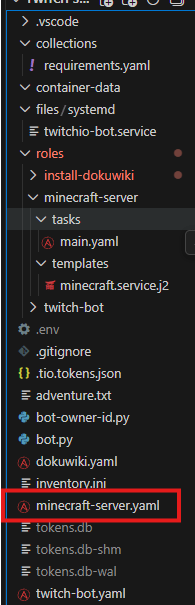
Minecraft-server.yaml
In our minecraft-server.yaml, we declare the name of the playbook, what hosts should execute its tasks, if we execute it as root and if we gather facts about the remote hosts, this can look something like below:
---
- name: Install everything so that the twitch bot can run
  hosts: servers
  become: true
  gather_facts: true

  roles:
    - minecraft-server
Inventory.ini
For our playbook to know on what device(s) we install the server and run it, we need to declare the exact IP and optionally the user (if its different from your host) to be able to connect and execute the playbook. (For this setup you need to create a private and public ssh key (ssh-keygen) and copy paste the public key to the remote host, else you can’t authenticate passwordless)
The file looks like below
[servers]
192.168.1.10 ansible_user=bulterr ansible_become=true
install-minecraft/tasks/main.ymal
This is our main tasks, here the magic happens, usually, when working with roles, you have multiple task-playbooks that work together, like a role for setting up IP config, one for users and group, maybe one for shares, one for firewall rules, and you would, depending on the playbook you want to create, add these to your root playbooks like Lego block (I guess modular modules)
The main code looks like below:
We install java and some side packages we, create a user and some folders, download the Minecraft server package, copy the eula file with value true, copy the service file, reload services and start the Minecraft server.
(The eula part you can do manually but then the server wont start unless it says eula=true, standard is eula=false)
- name: Install required packages
  ansible.builtin.apt:
    name:
      - openjdk-21-jre-headless
      - wget
      - screen
    update_cache: true

- name: Create minecraft user
  ansible.builtin.user:
    name: minecraft
    shell: /bin/bash
    create_home: true

- name: Create server directory
  ansible.builtin.file:
    path: /opt/minecraft
    state: directory
    owner: minecraft
    group: minecraft
    mode: "0755"

- name: Download Minecraft server
  ansible.builtin.get_url:
    url: https://piston-data.mojang.com/v1/objects/64bb6d763bed0a9f1d632ec347938594144943ed/server.jar
    dest: /opt/minecraft/server.jar
    owner: minecraft
    group: minecraft
    mode: "0755"

- name: Accept EULA
  ansible.builtin.copy:
    dest: /opt/minecraft/eula.txt
    content: "eula=true\n"
    owner: minecraft
    group: minecraft
    mode: "0755"

- name: Create systemd service
  ansible.builtin.template:
    src: minecraft.service.j2
    dest: /etc/systemd/system/minecraft.service
    mode: "0644"

- name: Reload systemd
  ansible.builtin.systemd:
    daemon_reload: true

- name: Enable and start Minecraft
  ansible.builtin.systemd:
    name: minecraft
    enabled: true
    state: started
minecraft.service
As lazy IT people, we don’t want to manage the minecraft server by hand and start it up every time we restart, so what do we do?
We create a service file!!
Service files are pretty much always build the same, we describe, set some dependencies, set a user, folder, start parameter and what to do if it should crash.
[Unit]
Description=Minecraft Server
After=network.target

[Service]
User=minecraft
WorkingDirectory=/opt/minecraft
ExecStart=/usr/bin/java -Xms1G -Xmx2G -jar server.jar nogui
Restart=always
RestartSec=10

[Install]
WantedBy=multi-user.target
Theoretically if you execute this like below it, you should be able to have a running minecraft server with standard server settings.
You can edit these in /opt/minecraft/server.properties
 Archive
Leave a comment